
How to Use SEO Tools for a More Reliable Workflow
Learn how to use SEO tools effectively: set goals, map your workflow, choose useful measurements and establish a baseline before making changes.

Use SEO tools by starting with a decision you need to make, then selecting the data that can inform it. Map how you will investigate, validate and act on a finding, and choose tools that answer specific questions rather than collecting metrics for their own sake. Record a baseline first so you can compare results after changes.
A tool is useful when its output changes what you do next. A crawl can reveal pages with indexing problems; search performance data can show which queries and landing pages deserve closer review. Neither finding is a task by itself: someone must check the context, decide what matters and assign the next step.
This guide shows how to build that process around clear goals, suitable measurements and repeatable checks. It also explains why baselines matter, so teams can distinguish the effect of their work from normal changes in search demand, site content or tracking.
- Begin with a decision, then choose evidence that can inform it.
- Verify findings and turn accepted issues into owned, testable tasks.
- Match each tool to a question and keep the toolkit focused.
- Record a consistent baseline before making changes and reviewing results.
Start with the decision you need to make
Turn goals into questions
Name the decision before opening a dashboard: for example, whether to refresh a landing page, investigate a crawl issue or expand coverage for a topic. A question gives your research a boundary and makes it easier to tell when you have enough evidence. Without one, teams often collect charts without reaching a useful next step.
- Mistake: tracking every available metric; instead, select measures tied to a decision.
- Mistake: treating a ranking fluctuation as a diagnosis; instead, check the page and search context.
- Mistake: setting a goal with no owner; instead, assign someone to assess and act on findings.
Translate broad aims such as growing organic traffic into a question tied to a page, audience or business outcome. You might ask whether an important product page is receiving qualified search visits, or whether a group of pages is being indexed as intended. Specific questions help you choose relevant reports and avoid treating every metric as equally important.
Keep the decision within the team's control. A ranking change can prompt an investigation, but a team cannot directly command a search engine to restore a position. It can review the page, check technical signals, improve the information offered and monitor what happens after the work is published.
Define what success means
Choose a primary outcome that reflects the work's purpose, then use supporting measures to explain movement. For a page update, relevant outcomes might include qualified organic visits or conversions, while impressions and clicks help describe search visibility. A rise in one measure alone does not prove the work produced a business benefit.
Set a scope that people can review consistently, such as a defined page group, market or query theme. Comparing an entire site with a small set of recently edited pages can hide meaningful changes. Write down the scope and the measurement period so colleagues can reproduce the same view later.
Separate the outcome from the activity. Publishing a revised title is an action, not evidence of success; changes in relevant impressions, clicks or conversions are evidence to assess. This distinction keeps reporting focused on what the work was meant to improve, while still recording completed tasks for accountability.
- Write the decision in one sentence.
- Name the pages, audience or market in scope.
- Select one outcome and supporting measures.
- Assign an owner to review the result.
Map the steps in your SEO workflow
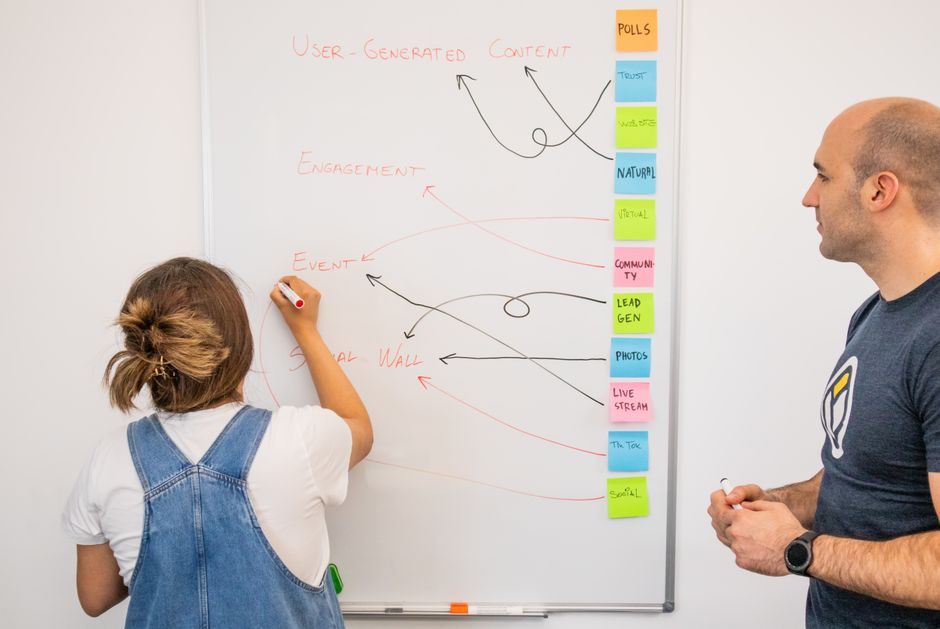
Build a repeatable sequence
Organize the work into discovery, validation, prioritization, implementation and review. This sequence prevents a tool alert from becoming a fix before anyone checks whether it affects important pages. It also makes handoffs clearer: an analyst can document evidence, while a developer or editor receives a specific task with a reason.
- Verify tool alerts before turning them into tasks.
- Give each accepted finding an owner and a next action.
- Review outcomes after changes are implemented.
For example, a crawler may flag pages that return an unexpected status. Verify a sample in the browser and compare the results with the intended site structure before creating tickets. If the pages are deliberate redirects, the alert may need no change; if valuable pages are inaccessible, the finding needs an owner and a remedy.
Record the source of each finding and the check used to confirm it. That short trail helps a colleague reproduce the issue and reduces repeated investigation when the same pattern appears elsewhere. Keep the workflow proportionate: routine checks can be lightweight, while changes affecting templates or many URLs need broader review.
Make handoffs actionable
A useful SEO task states what is wrong, where it occurs, why it matters and what should happen next. “Improve crawlability” is too vague for an engineer to act on; identifying affected URL patterns and the observed behavior makes the request testable. Include evidence that another person can check without repeating the entire analysis.
Prioritize work by combining likely impact, confidence in the diagnosis and effort required. A small correction to a key template may be more practical than a broad redesign supported by weak evidence. Make the reasoning visible, because teams can then challenge assumptions or adjust priorities when deadlines and dependencies change.
Close the loop by checking the implementation and recording when it went live. Confirm that the intended pages now behave as expected before using performance data to judge the result. If the outcome does not improve, revisit the diagnosis and conditions rather than repeating the same change without new evidence.
- Describe the observed issue and affected pages.
- Attach a reproducible example or report.
- State the intended change and its owner.
- Verify the implementation before judging impact.
Choose tools that answer specific questions
Match tools to evidence
Choose a tool according to the evidence your question requires. Search performance reports help examine queries, clicks and impressions; crawlers inspect pages and technical patterns; analytics platforms show what visitors do after arriving. These sources answer different questions, so treat their figures as complementary rather than interchangeable.
Start with existing access before adding another platform. A report already available in your analytics or search console may answer the question well enough, especially when the decision is narrow. Add specialist software when the current source lacks the necessary detail, repeatability or coverage, and make sure someone can interpret its output.
Check how a tool defines and collects its data before comparing results across platforms. Differences in attribution, sampling, crawl settings or date ranges can produce figures that appear inconsistent. Keep comparisons within a consistent source and configuration where possible, and investigate meaningful discrepancies instead of choosing whichever number looks most favorable.
| Question | Useful method | Evidence |
|---|---|---|
| Which queries reach a page? | Search performance report | Queries, clicks and impressions |
| What technical patterns affect URLs? | Site crawl | Status and page-level signals |
| What do visitors do after arrival? | Analytics review | Visits and on-site actions |
| Does a page show the intended content? | Manual page inspection | Rendered page and user-facing details |
Keep the toolkit focused
A compact toolkit is easier to maintain when each tool has a clear job and a regular user. List the questions your team asks repeatedly, then map each one to a data source and a person responsible for checking it. If two platforms provide the same view, keep both only when their different strengths justify the extra work.
Use a crawler for technical patterns across many URLs, and inspect representative pages manually to understand their visible content and purpose. Use search data to identify query and page trends, then check analytics when the decision concerns visits or on-site actions. This pairing gives you evidence from both search visibility and user behavior.
Before adopting a new tool, test whether its output can lead to a specific decision or task. Ask whether it covers the site and markets you need, whether reports can be repeated, and whether the team understands its limits. A tool that produces more alerts but no clearer priorities adds noise rather than capability.
- Assign one purpose to each tool.
- Confirm coverage and configuration.
- Check whether the team can interpret its output.
- Retain tools only when they support a useful decision.
Record the current state before changing a page, template or technical setting.
Set a baseline before making changes

Capture the starting picture
Record the current state before changing a page, template or technical setting. Capture the relevant URLs, date range, key measures and any known conditions that could affect interpretation, such as a recent redesign or tracking change. This baseline gives the team a reference point instead of relying on memory or a single later snapshot.
- ☐ Save the relevant pages, queries or URL patterns.
- ☐ Record the source, date range and metric definitions.
- ☐ Note known site or tracking changes.
- ☐ Set a follow-up review using the same scope.
Choose measures that fit the planned work and keep their definitions stable. For a page improvement, you might record organic clicks, impressions and conversions for the page group in scope. For a crawl fix, preserve the affected URLs and the observed status or indexability condition so the implementation can be checked directly.
Include enough context to make later comparisons fair. Search interest can shift, pages can be seasonally affected, and other site changes may happen during the same period. Note relevant events and avoid attributing every movement to one edit when several factors changed together.
Compare like with like
Use the same source, scope and measurement definitions when reviewing results after implementation. Comparing a page group with the whole domain can conceal what happened to the work itself, while changing date ranges can create misleading differences. If the scope must change, document why and keep the earlier view available for context.
Allow enough time for the change to be crawled and for the chosen outcome to become observable. The right review point depends on the type of change and how quickly the relevant data updates, so avoid promising an immediate result. Check implementation first; then interpret performance using the baseline and the surrounding context.
When results move in an unexpected direction, investigate before declaring success or failure. Check whether the page changed as intended, whether measurement still works and whether other site or search conditions shifted. A clear record of the baseline makes these checks faster and helps teams decide whether to continue, revise or roll back work.
- Reuse the original data source and scope.
- Confirm the change was implemented correctly.
- Check for measurement or site changes.
- Record the interpretation and next decision.
Track visibility in local search
Compare Places, Not Just Rankings
Track local visibility by checking how your business appears for the same service in different places, rather than treating one ranking as a complete picture. A plumber may appear prominently near its office but less often across the rest of its service area. Record the location, query, device, and date so later checks can be compared fairly.
Use a consistent set of location-based queries that reflect actual customer needs, such as a service plus a town or neighbourhood. Review map results and standard organic listings separately because they surface different pages and business information. Keep the query set manageable, and add terms only when they represent a distinct service, place, or customer intent.
A location grid can reveal patterns that a single search misses, but it is a diagnostic view rather than a promise of what every customer will see. Search results vary with context, so compare trends over time instead of reacting to one isolated position. Pair visibility checks with calls, direction requests, form submissions, or other relevant conversion data.
- Record the query and location together.
- Separate map and organic results.
- Compare like-for-like checks over time.
Connect Profiles, Pages, and Citations
Local visibility depends on more than a business profile or a location page in isolation. Check that business details, services, and opening information agree across the profile, the relevant website page, and trusted directory listings. Differences in names, addresses, phone numbers, or service descriptions can make it harder for customers and search systems to understand the business.
Use the search results to identify which page Google appears to favour for each location and service. If a general service page ranks where a location page should, check internal links, page relevance, and whether the local page offers genuinely useful information. Local Seo Services can help readers see how profiles, pages, and citations fit together when tracking location-level visibility.
Choose measures that show whether local search is helping people take action, not just whether a listing moved. Depending on the business, this may include qualified calls, booking requests, direction requests, or visits to a location page. Compare these outcomes with visibility changes, while accounting for seasonal demand and other marketing activity that may affect results.
Prioritize findings by impact and effort

Rank Issues by Business Impact
Prioritize a finding by asking what it blocks, how many important pages it affects, and whether it is connected to a business goal. A crawl issue that prevents key product pages from being indexed deserves attention before a minor metadata inconsistency on a low-value page. Write down the evidence and likely consequence so the order is explainable.
Separate confirmed problems from hypotheses before creating tasks. For example, a sudden drop in organic clicks is a signal to investigate, not proof that a technical change caused it. Check affected URLs, timing, search queries, and recent releases; then describe the finding in terms that make its impact and uncertainty clear to whoever will act on it.
When audit findings need specialist follow-through, Seo Services can help readers explore broader SEO support; the priority should still come from the business risk and evidence. A practical backlog records the issue, affected pages, supporting data, owner, and next action. This prevents a tool’s severity label from becoming an automatic instruction to fix everything it flags.
- Protect important pages and conversions.
- Distinguish evidence from assumptions.
- Record an owner and next action.
Balance Effort Against Confidence
Estimate the effort needed to resolve each issue alongside its potential benefit and confidence. Updating a broken internal link may be quick and low risk, while restructuring a large site may require coordination and testing. A simple impact-versus-effort view makes trade-offs visible without pretending that every task can be scored precisely.
Consider dependencies before assigning work. A content update may rely on research, approvals, or a developer release, while a technical correction may need staging checks before it reaches production. Group related issues when one change can address several findings, but verify that the combined task remains clear enough to test and assign.
Keep a small set of top priorities active and leave lower-impact findings in a reviewed backlog. Revisit priorities when new evidence appears, business goals change, or a fix produces unexpected effects. This approach makes the workflow adaptable without allowing every fresh alert to displace work that already has a clear owner and measurable purpose.
Test the workflow in a real service area
Run a Local Pilot
Test the workflow on one real service area before applying it across every location. Choose a place where the business has a genuine presence or serves customers, then define its core services, target queries, and useful conversion actions. Leicester Seo Services can provide a specific-market example of applying a repeatable local-search workflow in Leicester.
Start by documenting the current state of the business profile, relevant landing pages, local citations, and search visibility. Check that the selected queries match what the business actually offers and that the location is not being implied where it has no staffed presence. Keep a record of the exact checks so another team member can reproduce them.
The pilot should test whether the workflow produces useful decisions, not simply whether a ranking improves. If the findings point to inaccurate details, a thin location page, or inconsistent citations, record the evidence and choose a focused change. This lets the team assess whether its process can identify actionable work before it commits to a broader rollout.
- Select a genuine service area.
- Document the existing profile and pages.
- Choose queries tied to real services.
Check the Change, Then Learn
After making a change, allow enough time for it to be crawled and reflected before judging its effect. Recheck the same queries, locations, pages, and conversion measures used in the baseline. If several updates went live together, note that the result cannot be confidently attributed to any single change.
Look for both expected and unintended effects. A revised location page might attract more relevant visits but also expose gaps in booking information or service coverage. Check whether the page answers practical customer questions, whether contact actions work, and whether the search terms bringing visitors align with the service being offered.
Use the pilot to refine the process itself. If a measurement was difficult to reproduce, specify the tool settings or data source more clearly; if a finding did not lead to a decision, reconsider whether it belongs in routine reporting. Carry forward the checks that helped the team act, and document limitations that could affect comparisons in other markets.
Keep reporting focused and repeatable

Build a Decision-Ready Update
Make each report answer a small number of business questions, such as whether important pages are discoverable, whether local visibility is changing, or which issue needs action next. Put the finding beside its evidence and implication. A list of tool exports without interpretation forces readers to do the analysis themselves and obscures the decisions that matter.
- Choose the reporting question.
- Use consistent definitions and periods.
- Record findings and limitations.
- Assign the next action and review it.
Use the same definitions and reporting periods when comparing results. Explain whether a metric represents clicks, impressions, indexed pages, rankings, or completed actions, since similar labels can describe different things across tools. Where data coverage is incomplete or a tracking change affects the comparison, state that limitation beside the result rather than burying it.
A reliable reporting rhythm makes follow-up easier: name the task owner, expected next step, and the signal that will show whether the work helped. Avoid presenting every available metric in every update; retain detail in a working dashboard and surface changes that alter a decision. This keeps reports useful to specialists while remaining readable for business owners.
- State the decision or question.
- Show evidence beside its implication.
- Name an owner and next check.
Maintain a Consistent Review
Set a review routine that matches the pace of the work rather than checking every metric constantly. Technical monitoring may need attention after a release, while broader visibility trends are more useful when compared across stable periods. The right cadence depends on the site, the change being measured, and how quickly the team can respond.
Keep a short record of changes that could explain movement, including deployments, content updates, tracking adjustments, and major campaign activity. This context helps prevent teams from attributing every rise or fall to SEO work. When a result is unclear, investigate the relevant pages and data sources before changing the plan.
Review the workflow itself as well as its outcomes. Remove checks that repeatedly produce no decision, clarify measurements that different people interpret differently, and preserve checks that catch consequential problems. A documented process makes handovers smoother and helps teams compare work across clients, sites, or markets without assuming that identical tactics will suit every business.
Frequently asked questions
How often should I check SEO tool data?Match the check to the decision and the rate at which the underlying data can change. Review technical issues after important releases, and assess visibility or conversion trends on a consistent schedule rather than reacting to daily movement. If a metric changes sharply, verify the data source, affected pages, and possible tracking changes before deciding that SEO performance has shifted.
Can I build an SEO workflow with free tools?Yes, provided the tools answer the questions your workflow needs to resolve. Start with access to search performance and indexing data, a crawler or page checker for relevant technical questions, and a clear way to record findings and actions. Free tools may have limits in coverage or convenience, so note those limits and use additional sources only when they improve a decision.
What should I do when SEO tools disagree?First check whether the tools use the same date range, location, device, URL scope, and metric definition. Different sources may collect or model data differently, so a mismatch does not automatically mean one is broken. Compare the underlying examples, identify which source is closest to the decision you need to make, and record uncertainty rather than blending incompatible figures.
How can I tell whether an SEO fix worked?Set a baseline before the change and choose an outcome that matches its purpose. For an indexing fix, check whether the affected pages can be crawled and appear in index data; for a content change, review relevant visibility and qualified visits. Recheck the same pages and measures after the change has had time to take effect, while noting other changes that could influence results.
Turn Tool Findings Into Consistent Decisions
SEO tools become more useful when each check supports a decision, each finding has evidence, and each task has an owner. For local visibility, compare the same services and places, then connect search signals to accurate profiles, useful pages, and customer actions. Prioritize based on business impact and effort, and treat scores or ranking shifts as evidence to interpret rather than instructions to follow.
Choose one real service area and run the workflow from baseline through reporting: define the question, capture the current state, make a focused change, and review the same measures. Record what the process revealed and where its data was limited. Then refine the checks before extending them, so the next round of work is easier to reproduce and more likely to lead to a useful action.

Add Link Building App as a preferred source on Google


